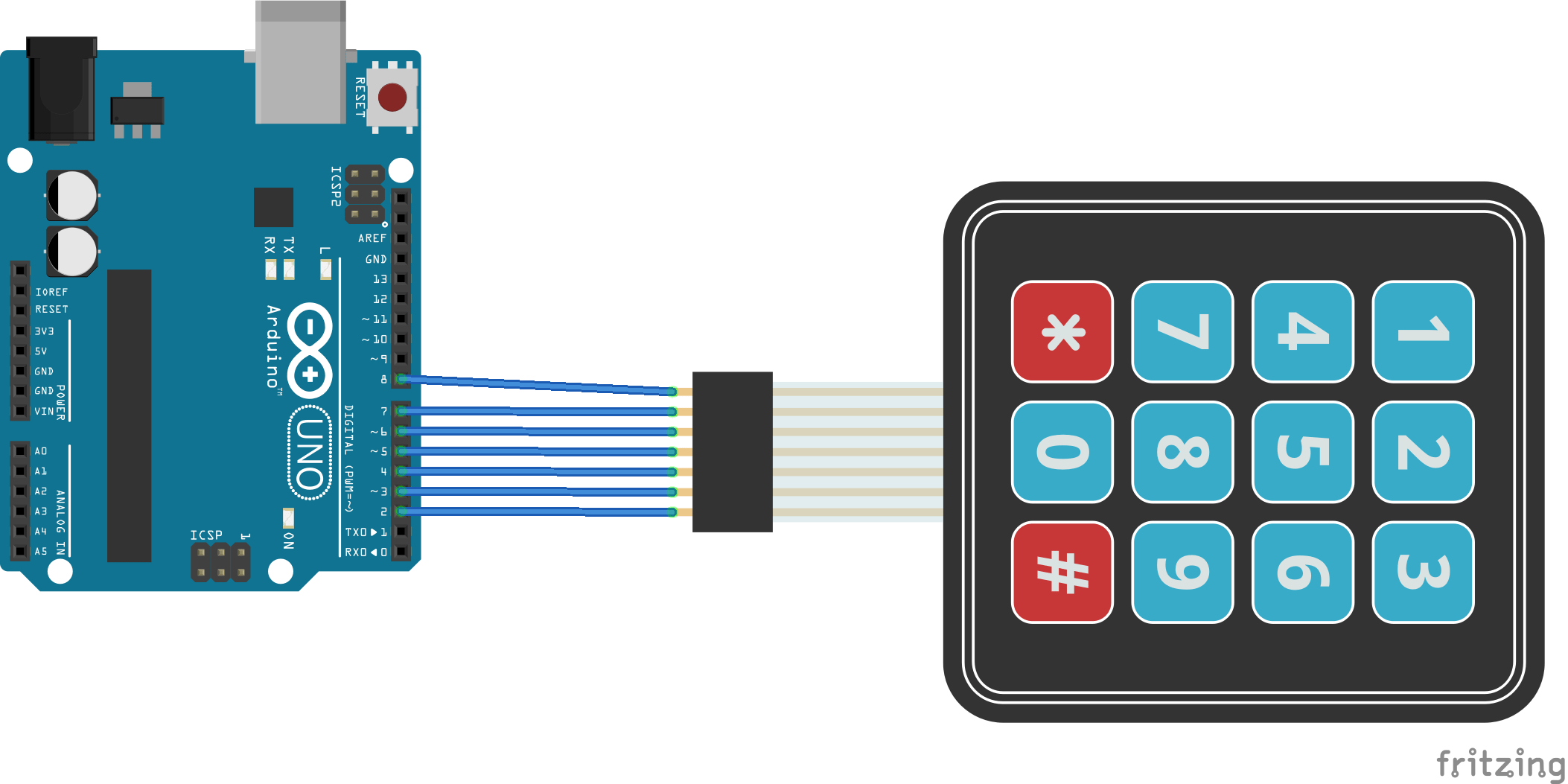
Alright, so I'm finally on the verge of getting my project finished. But for whatever reason, my code or my nodes are working. I have a keypad (https://www.adafruit.com/product/419) and I am wanting to tell my Whisper Node to send motor speed and direction to this motor controller (http://www.robotshop.com/en/30a-5-30v-s ... fgodL1QGTA). I already have the code written but it isn't working. Some help troubleshooting would be much appreciated! I hate to ask but I'm about to pull my hair out over it.. 

Transmitter Code:
And the reciever code is here:
Transmitter Code:
Code: Select all
#include <T2WhisperNode.h>

#include <Keypad.h>
#include <RH_RF69.h>

#define joystick_x    A0
#define joystick_sel  A2

RH_RF69 rf69;

const byte ROWS = 4;
const byte COLS = 3;

char keys[ROWS][COLS] = {
  {'1', '2', '3'},
  {'4', '5', '6'},
  {'7', '8', '9'},
  {'#', '0', '*'}
};

byte rowPins[ROWS] = { 8, 7, 6, 5};
byte colPins[COLS] = { 4, 3, 2 };

Keypad myKeypad = Keypad( makeKeymap(keys), rowPins, colPins, ROWS, COLS );

int dir = 0;
int speedM = 0;
String input = "";
char previousKey;
uint8_t data = 0;
unsigned long lastMillis = 0;
int count = 0;
boolean record = false;

void setup() {
  Serial.begin(9600);
  Serial.println("Code uploaded.");
  if (!rf69.init())
    Serial.println("init failed");
  if (!rf69.setFrequency(915.0))
    Serial.println("setFrequency failed");

  // The encryption key has to be the same as the one in the server
  uint8_t key[] = { 0x01, 0x02, 0x03, 0x04, 0x05, 0x06, 0x07, 0x08,
                    0x01, 0x02, 0x03, 0x04, 0x05, 0x06, 0x07, 0x08
                  };
  rf69.setEncryptionKey(key);

  pinMode(joystick_sel , INPUT_PULLUP);
  pinMode(4,  INPUT_PULLUP);
  pinMode(5,  INPUT_PULLUP);
}
void loop(){
  char key1 = myKeypad.getKey();

  if (key1 != NO_KEY || key2 != NO_KEY){
    Serial.print("You pressed: ");
    Serial.print(key1 != NO_KEY ? key1 : "nothing on keypad");
  Serial.print(" and ");
    Serial.print(key2 != NO_KEY ? key2 : "nothing on keypad2");
    Serial.println(".");
  }
}
void loop() {
  char keypressed = myKeypad.getKey();
  Serial.println(keypressed);
  if (keypressed != NO_KEY && keypressed != previousKey)
  {
    input = input + keypressed;
    previousKey = keypressed;
    lastMillis = millis();
  }
  if (input.equals("*#") && millis() - lastMillis >= 3000 && keypressed == '#')
  {
    record = true;
    Serial.println("Recording Mode");
    uint8_t data[] = "0";
    rf69.send(data, sizeof(data));
    rf69.waitPacketSent();
    input = "";
  }
  if (keypressed == '0')
  {
    count = 0;
    record = false ;
  }

  //--------------------------------Record Mode--------------------------------
  if (record)      // rotate and store
  {
    keypressed = myKeypad.getKey();
    uint8_t data[1] ;
    ((String)keypressed).toCharArray(data,sizeof(data));
    rf69.send(data, sizeof(data));
    rf69.waitPacketSent();
    /*int dir_raw = analogRead(joystick_x);
      if (dir_raw > 512)
      {
      dir = 1;    //CW
      }
      if (dir_raw < 512)
      {
      dir = 2;   //CCW
      }
      if (dir_raw == 512)
      {
      dir = 0;  //Neutral
      }
    */
    if (digitalRead(4) == LOW) { //built in button for temportary testing
      dir = 1;   //CW
    }
    if (digitalRead(5) == LOW) { //built in button for temportary testing
      dir = 2;   //CCW
    }
   /** if (digitalRead(joystick_sel) == LOW)
    {
      speedM = (speedM + 1) % 3 ;
    } **/
    sendPath();
  }

  //--------------------------------Play Mode--------------------------------
  for (int i = 1 ; i <= 9 ; i++) {
    if (keypressed == (i)) {
      uint8_t data[1] ;
      ((String)keypressed).toCharArray(data,sizeof(data));
      rf69.send(data, sizeof(data));
      rf69.waitPacketSent();
    }
  }
  delay(500);
}

void sendPath () {
  count = 1;
  if (dir == 1) {
    uint8_t data[] = "1";
    rf69.send(data, sizeof(data));  //CW
    rf69.waitPacketSent();
  }
  if (dir == 2) {
    uint8_t data[] = "2";
    rf69.send(data, sizeof(data));  //CCW
    rf69.waitPacketSent();
  }
  if ( dir == 0) {
    uint8_t data[] = "0";
    rf69.send(data, sizeof(data));
    rf69.waitPacketSent();
  }
  if (speedM == 1) {
    uint8_t data[] = "3";
    rf69.send(data, sizeof(data));   //Slow
    rf69.waitPacketSent();
  }
  if (speedM == 0) {
    uint8_t data[] = "4";
    rf69.send(data, sizeof(data));   //Fast
    rf69.waitPacketSent();
  }
}
Code: Select all
#include <SD.h>
#include <SPI.h>
#include <RH_RF69.h>

#define direct 4
#define sp 5

RH_RF69 rf69;

int Speed = 125;
int slow_Speed = 125;
int high_Speed = 255 ;    //Adjust high speed and low speed values from 0-255 according to the requirements
int direction ;
int index , fileNum ;
boolean record = false;
File p[9] ;
const char* Path[9] = {"p[1].txt", "p[2].txt", "p[3].txt", "p[4].txt", "p[5].txt", "p[6].txt", "p[7].txt", "p[8].txt", "p[9].txt"};

void setup() {
  Serial.begin(9600);
  if (!rf69.init())
    Serial.println("init failed");
  if (!rf69.setFrequency(915.0))
    Serial.println("setFrequency failed");
  uint8_t key[] = { 0x01, 0x02, 0x03, 0x04, 0x05, 0x06, 0x07, 0x08,
                    0x01, 0x02, 0x03, 0x04, 0x05, 0x06, 0x07, 0x08
                  };
  rf69.setEncryptionKey(key);

#if 0
  // For compat with RFM69 Struct_send
  rf69.setModemConfig(RH_RF69::GFSK_Rb250Fd250);
  rf69.setPreambleLength(3);
  uint8_t syncwords[] = { 0x2d, 0x64 };
  rf69.setSyncWords(syncwords, sizeof(syncwords));
  rf69.setEncryptionKey((uint8_t*)"thisIsEncryptKey");
#endif
  if (!SD.begin(10)) {
    Serial.println("SD card initialization failed!");
    return;
  }
  pinMode(direct , OUTPUT);
  pinMode(sp , OUTPUT);
}

void loop() {
  if (rf69.available())
  {
    uint8_t buf[RH_RF69_MAX_MESSAGE_LEN];
    uint8_t len = sizeof(buf);
    if (rf69.recv(buf, &len))
    {
      String str = (char*)buf;
      if (str == "Record") {
        Serial.print("Writing to file ");
        record = true;
      }
      if (str == "Finish") {
        Serial.print("Path recording complete");
        record = false;
      }
      for (int i = 1 ; i < 10 ; i++) {
        if (str == (String)i && record == true) {
          Serial.println(str);
          fileNum = (i - 1);
        }
        else if (str == (String)i && record == false) {
          p[i - 1] = SD.open(Path[i - 1]);
          if (p[i - 1]) {
            Serial.println("File Open");
            // read from the file until there's nothing else in it:
            while (p[i - 1].available()) {
            int d = p[i - 1].read();
              Serial.write(p[i - 1].read());
              if (d == 1) {                  //CW
                digitalWrite(direct , LOW);
                digitalWrite(sp , Speed);
              }
              if (d == 2) {                 //CCW
                digitalWrite(direct , HIGH);
                digitalWrite(sp , Speed);
              }
              if (d == 3) {                  //Slow speed
                Speed = slow_Speed ;
                digitalWrite(sp , Speed);
              }
              if (d == 4) {                  //CCW
                Speed = high_Speed ;
                digitalWrite(sp , Speed);
              }
            }
            // close the file:
            p[i - 1].close();
          } else {
            // if the file didn't open, print an error:
            Serial.println("Error opening file");
          }
        }
      }

      if (record) {
        if (p[fileNum]) {
          Serial.println(str);
          p[record].println(str);

           if (str == "1") {                  //CW
                digitalWrite(direct , LOW);
                digitalWrite(sp , Speed);
              }
              if (str == "2") {                 //CCW
                digitalWrite(direct , HIGH);
                digitalWrite(sp , Speed);
              }
              if (str == "3") {                  //Slow speed
                Speed = slow_Speed ;
                digitalWrite(sp , Speed);
              }
              if (str == "4") {                  //CCW
                Speed = high_Speed ;
                digitalWrite(sp , Speed);
              }
        }
      } else {
        // if the file didn't open, print an error:
        Serial.println("error opening file");
      }
    }
    else
    {
      Serial.println("recv failed");
    }
}
}